
How Accessibility Scans Work Inside EaseAccess24
Accessibility compliance inside EaseAccess24 starts directly from the sidebar navigation.
To begin, navigate to the **Accessibility** section in the left-hand menu. Inside this section, you will find the **Jobs** tab — this is where every accessibility scan begins.
Starting a New Scan
Inside the Jobs tab, you can create a new scan job. Once initiated, EaseAccess24 crawls your entire website, analysing pages, components, and structures to detect accessibility violations based on WCAG standards.
The system performs a full website crawl, identifying issues across all accessible pages and generating a structured analysis of detected problems.
Before launching the scan, you can choose between three scan modes:
Accessibility Check Only
This mode performs a full accessibility analysis without applying any changes. It provides a complete overview of detected issues for review and manual remediation.
Accessibility Check with Semantic Fixes
This mode performs the accessibility analysis and applies fixes related to semantic structure. These improvements do not affect layout or CSS styling. It focuses on correcting markup, roles, attributes, and structural accessibility issues while preserving visual design.
Accessibility Check with UI-Level Changes
This mode applies deeper fixes that may affect the user interface. In addition to semantic improvements, it can adjust elements that impact visual presentation to resolve accessibility barriers more comprehensively.
Depending on the mode selected, the platform delivers the corresponding level of remediation and results.
Reviewing the Accessibility Analysis
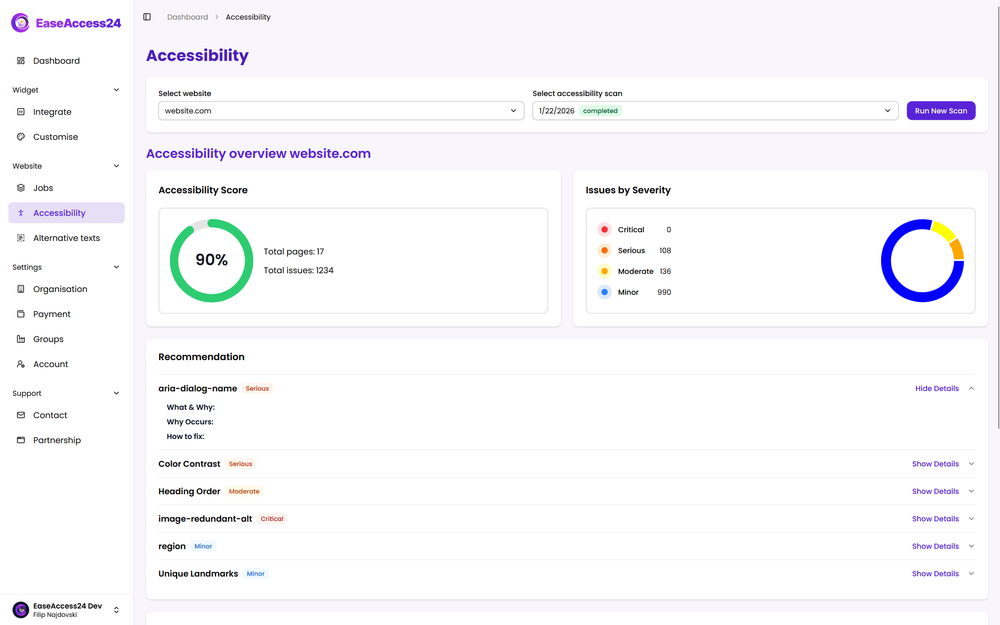
Once the scan is completed, you can navigate back to the Accessibility section to review the detailed analysis.
The analysis dashboard allows you to:
• Examine every scanned page
• Review each detected issue in depth
• See which WCAG criteria were triggered
• View the exact code-level locations of the issues
• Identify where fixes were applied
• See who applied or approved specific fixes
This level of transparency ensures full visibility across your accessibility workflow.
You can clearly distinguish between detected issues, automatically applied fixes, and pending remediation tasks — enabling structured collaboration across your team.
Full Workflow Visibility
The Accessibility section transforms scanning into a controlled workflow:
Start a job.
Choose your remediation mode.
Allow the system to crawl and analyse your website.
Review detailed results.
Track applied fixes and ownership.
This structured process ensures that accessibility inside EaseAccess24 is not just detection — it is measurable, actionable, and traceable.
Accessibility becomes manageable when it is structured, transparent, and continuously monitored.