A Step-by-Step Guide to Managing Roles and Permissions
Accessibility compliance is a team effort. Whether you’re working with developers, compliance officers, product managers, or external partners, structured collaboration is essential.
EaseAccess24 allows you to invite team members and assign roles directly from your organisation settings — giving you full control over access and responsibilities.
Here’s how it works.
Navigate to Organisation Settings
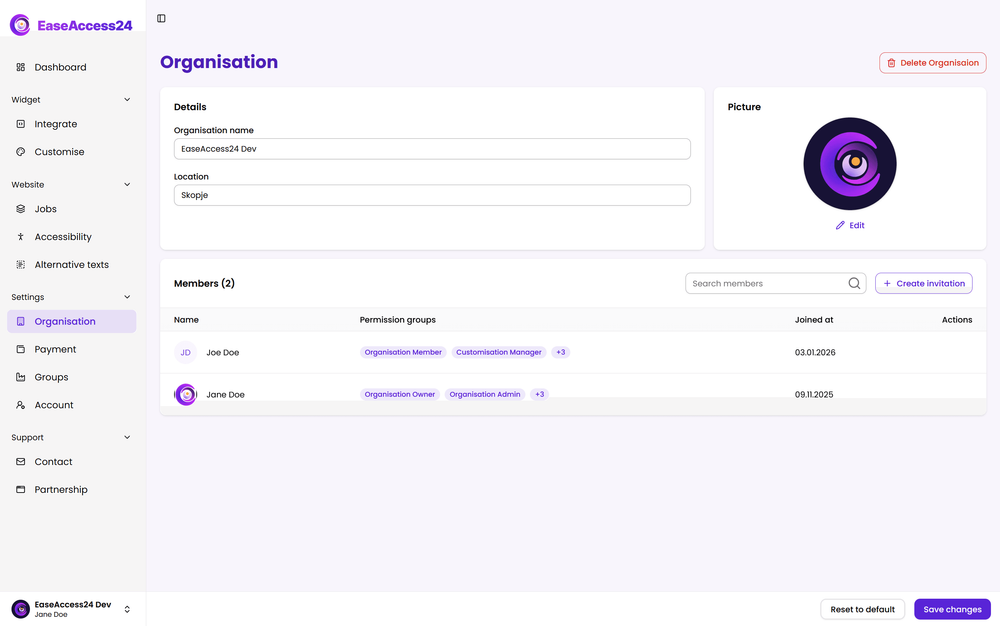
To invite your team, open your dashboard and go to:
Settings → Organisation
This section allows you to manage users, roles, and permissions across your organisation.
From here, you can view existing team members, adjust their access levels, or invite new users.
Invite New Users
Inside the Organisation section, you can invite new team members by entering their email address.
Once invited, users will receive access to your organisation’s workspace according to the permissions you assign.
This ensures structured onboarding without sharing unnecessary administrative access.
Assign Predefined Roles
EaseAccess24 includes predefined roles to simplify team management.
Depending on your organisation’s needs, you can assign roles such as:
Organisation Admin – Full system control, including billing and settings
Accessibility Manager – Manages scans, fixes, and compliance workflows
Organisation Member – Limited operational access
Each role comes with predefined permissions to ensure clarity and security.
Create Custom Permissions
For teams with more complex workflows, you can create custom permission sets.
This allows you to define exactly what a user can:
• Run accessibility scans
• Approve AI-powered fixes
• Modify widget configurations
• Access compliance reports
• Manage monitoring settings
Custom permissions ensure your internal governance structure is reflected accurately within the platform.
Maintain Accountability and Control
Role-based access ensures that:
• Sensitive settings remain protected
• Teams collaborate efficiently
• Compliance actions are traceable
• Responsibilities are clearly assigned
Every accessibility initiative benefits from clear ownership and structured access control.
Build Your Accessibility Team
Accessibility is not a one-person responsibility. It requires collaboration between technical teams, compliance managers, and leadership.
By inviting your team and assigning the right permissions, you transform EaseAccess24 from a tool into a structured accessibility workflow system.
To get started, navigate to:
Settings → Organisation
Invite your team. Assign roles. Define responsibilities.
Accessibility works best when everyone has the right level of access — and the right level of accountability.