Understanding Full Crawl Results in EaseAccess24
When you run a full crawl of your website inside EaseAccess24, the platform does more than generate an overall compliance score.
It gives you complete visibility — both at the global level and on an individual page basis.
Here’s how it works.
Running a Full Website Crawl
When you start a crawl job, EaseAccess24 scans your entire website. The system analyses pages, components, structure, and code to detect accessibility violations aligned with WCAG standards.
Once the crawl is completed, you receive:
• An overall accessibility score
• A compliance overview
• A breakdown of detected issues
• Severity categorisation
• Applied fixes (if enabled during the crawl)
But the real power comes from drilling down deeper.
Navigate to Page-Level Analysis
After completing your first crawl, go to the Accessibility page inside the dashboard.
Scroll down to the Accessibility Issues section. Here you will see:
• A visual graph summarising detected issues
• A structured list of scanned pages
Each page is listed independently, allowing you to analyse performance page by page.
Independent Page Assessment
By clicking on a specific page, you can assess its accessibility score independently from the overall website score.
This gives you a clearer understanding of:
• Which pages perform well
• Which pages contain critical issues
• Where accessibility barriers are concentrated
You can also categorise and filter pages based on:
• Issue severity
• Specific WCAG criteria
• Type of accessibility violation
This makes it easier to prioritise remediation efforts strategically.
Viewing Issues at Code Level
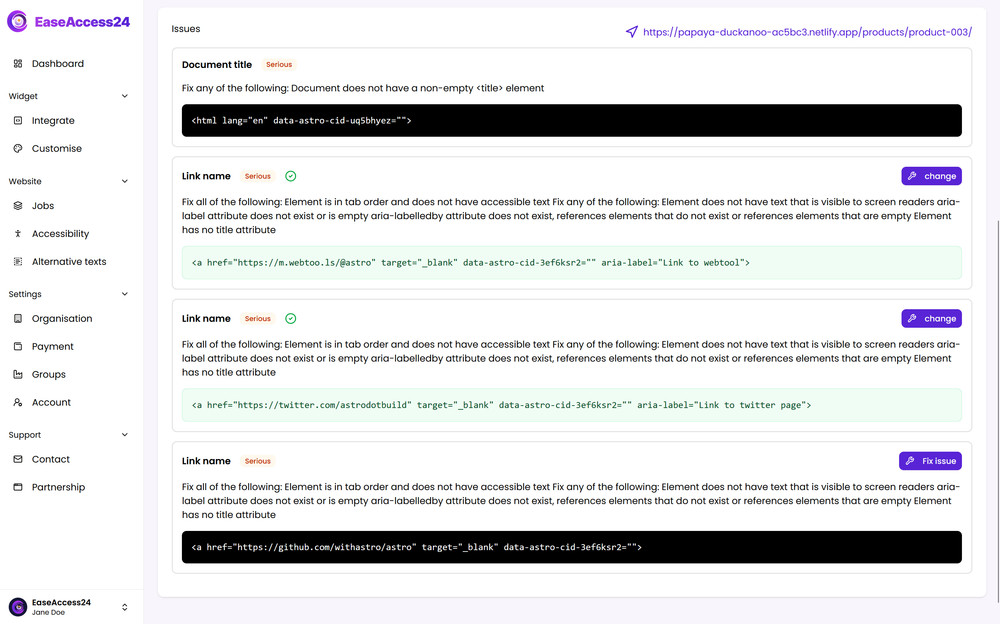
When reviewing a specific page, you can see all detected issues occurring on that page.
For each issue, the platform shows:
• The severity level
• The affected element
• The relevant WCAG rule
• The exact location in the code where the issue occurs
This allows developers to identify precisely where the accessibility barrier exists.
Fixing Issues Directly
If you did not enable automatic fixes during the crawl, you can apply fixes directly from the issue view.
This ensures flexibility — you can choose whether to:
• Review issues first
• Approve fixes manually
• Apply remediation selectively
EaseAccess24 gives you control over the remediation workflow.
Structured Visibility Across Your Website
Full-site crawling provides a comprehensive overview. Page-level analysis provides precision.
Together, they allow you to:
Understand overall compliance status.
Drill down into individual page performance.
Categorise issues by severity or type.
Locate problems at the exact code level.
Apply fixes in a controlled manner.
Accessibility becomes measurable and actionable when you can move seamlessly between global overview and detailed page inspection.
With EaseAccess24, you do not just detect issues — you gain structured visibility and controlled remediation across your entire website.